



This article follows the content creation and review process of the Helian Expert Team. Every figure is checked against our own test records before publication.
A section drawing of a recessed LED profile usually carries four or five numbers, all in millimeters, with no labels. Two of them are what you need to select the profile. One of them is the one people mix up, and getting it wrong is why a strip arrives that will not fit.
What are the five numbers on a section?
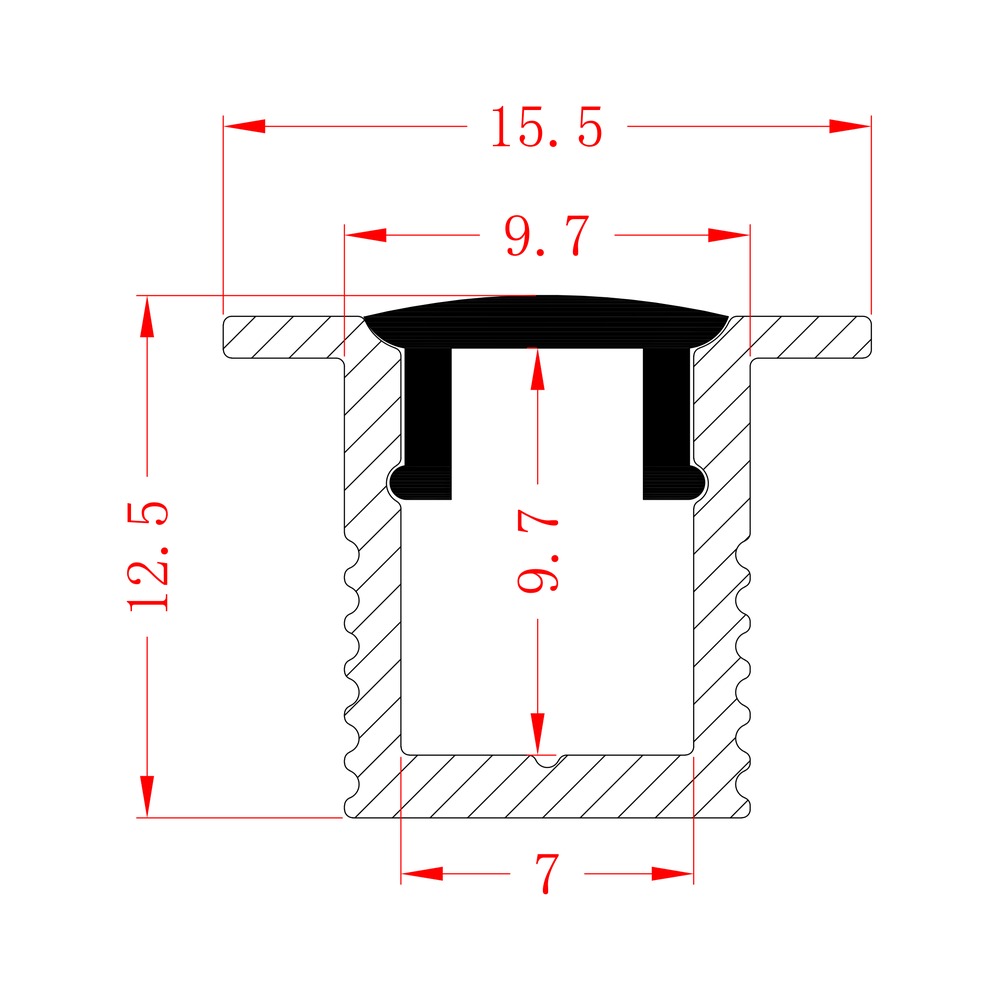
Take HL-A065 as the example — a recessed body, 15.5 × 12.5 mm, taking a 6 mm strip. Its drawing carries five dimensions:
| Number on the drawing | What it measures | What it decides |
|---|---|---|
| 15.5 | Outer width | How wide the slot has to be; visual weight |
| 12.5 | Outer height | How deep the slot has to be |
| 9.7 (horizontal) | Opening between the cover grooves | How wide the light aperture reads |
| 9.7 (vertical) | Internal cavity height | How far the strip sits below the cover |
| 7 | Strip channel width at the base | Which strip will physically fit |
The first two are the envelope. The middle two are optics. The last one is compatibility — and it is the one that stops an order.
Which number is the PCB width?
Not the 9.7, and not the outer width. It is the 7 — the internal channel at the base, where the strip sits.
That creates a second confusion, because the product page says “6 mm” for this profile, not 7. Both are correct, and they describe different things:
- 7 mm is the channel — the physical gap between the base walls.
- 6 mm is the strip the body is designed around — the PCB width we quote.
The 1 mm difference is clearance. A 6 mm PCB in a 7 mm channel leaves room for the adhesive, for the strip to be laid flat rather than forced, and for the solder pads at the ends, which are often slightly wider than the board.
So a listing that says “10 mm” could mean either. In our listings, the figure is the PCB width, and the channel around it is wider—which is why the drawing and the product page don’t contradict each other; they answer different questions.
Why does that matter in practice?
Because a strip that is 1 mm too wide does not “just fit”. Three things happen:
- It sits proud instead of flat. The adhesive contacts along a line, not a face, and the thermal path is lost — which is the failure described in the heat articles, arriving from a dimension error rather than a design error.
- The cover will not seat. A strip wedged into the channel lifts the edges, and the diffuser groove is right above them.
- The ends will not close. Solder pads and connectors add width at the ends, exactly where the end cap has to sit.
A 6 mm strip in a 7 mm channel is comfortable. An 8 mm strip in the same channel is not a tight fit — it is the wrong profile.
What about the two 9.7s?
They are not the same dimension, even though they carry the same number on this drawing.
The horizontal 9.7 is the opening between the two cover grooves — the width of the light aperture as seen from below. It is an optical dimension: it sets how wide the line of light reads.
The vertical 9.7 is the cavity height — the distance from the channel floor to the underside of the cover. It is what allows the light from adjacent diodes to mix before it reaches the diffuser. A shallow cavity shows dots; this one has enough depth for a 6 mm strip behind an opal cover.
Two dimensions, same figure, different jobs. It happens because the section was drawn to those proportions, not because one of them is a mistake.
What about tolerances?
A drawing without tolerances describes a shape, not a product.
Three categories matter on an extrusion, and they are usually tabulated separately:
Cross-sectional dimensions — the five numbers above, each with a permitted deviation. These are tied to the size of the section: a 15.5 mm width and a 76 mm width do not carry the same allowance.
Form tolerances — straightness along the length, twist of the section, flatness of a face. These do not appear on the section at all, and they are what makes a long run look straight or wavy.
Cut length and end squareness — introduced by cutting, not by extrusion. A body can be within every cross-sectional tolerance and still leave a gap at a joint because the end was not cut square.
The practical point: a dimension on a drawing is a nominal value, and the tolerance is what you actually get. If a project depends on a specific fit, the tolerance has to be stated, not assumed.
What is not on the drawing but matters?
Four things, all of which affect whether the installation works:
Alloy and temper. The drawing shows a shape; the material is called out separately. Ours is 6063 throughout.
The cover. The section accepts a cover in a groove, but which cover — clear, frosted, opal, or a lens — is a separate decision, and it changes the light more than any dimension on the drawing.
The accessories. End caps, clips, connectors: whether a connector exists for this section is not visible in the section itself. For HL-A065 it does not — that section is meant for short runs.
The length. Our profiles are supplied in any length up to 4 m, cut to your size. That figure isn’t on a section drawing, and it determines how many joints a run will have.
How do you check a drawing before ordering?
Five steps, in this order:
- Find the channel width — the number at the base of the section, not the outer width, not the aperture.
- Compare it with your strip’s PCB width, allowing 1–2 mm clearance.
- Check the outer height against the slot depth you can cut — a 12.5 mm body needs 12.5 mm of depth.
- Check the aperture against the look you want — a 9.7 mm opening reads as a narrow line, a 40 mm opening reads as a band.
- Ask which accessories exist for that section, because the drawing will not tell you.
Our range lists outer width, outer height, and PCB width for all 219 profiles, so steps 1 to 4 can be done from the listing before opening a single PDF. When a drawing is ambiguous, the contact page is faster than guessing — send the strip width and the depth available, and we will name the section.
Is the inner width the same as the PCB width?
On our listings, no — the quoted figure is the PCB width the body is built around, and the physical channel is wider. OInsome other catalogs, the figure is the channel width. Always check which one a listing means before comparing two products.
What does the second 9.7 on the drawing mean?
The vertical one is the cavity height — the distance from the strip to the cover. It sets how much the light mixes, and therefore whether dots are visible at close range.
Do I need the drawing if I already have the model number?
It helps for two things: confirming the channel against your strip, and confirming the depth against your slot. The model number tells you which profile; the drawing tells you whether it fits your detail.
Why are there no tolerances on my drawing?
Because a section drawing and a specification drawing are different documents: a catalog section drawing shows geometry; a manufacturing drawing carries tolerances, alloy, temper, and inspection requirements. If a project depends on a fit, ask for the second kind.
Can I use a photograph instead of a drawing?
To start a conversation, yes — with a scale in the frame. To order, no. A photograph cannot tell you the channel width or the wall thickness, and those are the two figures the order depends on.